A well-timed, clear invoice shapes both cash position and client experience. Small changes to the billing process can cut follow-up time and reduce disputes.
Clear invoices list an issue date, a unique ID, seller and buyer details, line items, totals, and explicit payment terms. These elements protect accounting, tax records, and legal standing.
This guide shows how a consistent process helps businesses manage receivables and stabilize cash flow across services and products. You’ll learn when to send an invoice, what information avoids confusion, and how design and automation speed payments.
An accurate invoice ties a sale to a date, a number, and a clear dollar amount. That simple record does more than request payment; it creates a reliable source of truth for operations and finance. Given that 87% of businesses receive invoice payments after the due date, having precise, well-structured invoices is critical for reducing delays and maintaining predictable cash flow. Clear documentation, accurate totals, and timely delivery not only support accounting and legal compliance but also help ensure clients can review and approve payments efficiently.
Precise details let accounting post accurate entries and reconcile quickly. Dated invoices feed receivables reports and improve cash forecasting for businesses.
They also form legal evidence of agreed terms. Clear descriptions help a client map charges to work completed and reduce disputes.
Align invoice fields with internal time, expense, and product data to cut errors and speed month‑end closes.
When you align billing moments with work milestones, money moves faster. Clear timing policies help teams collect on time and reduce disputes.
Many service firms issue an invoice in arrears after delivery. Use milestones or retainers for ongoing projects to balance cash needs and client expectations.
Tip: Add an acceptance sign-off with milestone bills to speed approvals and get paid faster.
Large projects benefit from progress payments tied to measurable phases. Subscriptions and monthly cycles use recurring invoices to predict cash flow and simplify receivables management.
Ask for deposits when materials or capacity are at risk. State deposit terms clearly to protect cash and preserve client relationships.
Simple, documented payment rules help cash flow and keep clients aligned. Clear rules reduce questions and speed approvals.
Setting Clear Payment Terms
Onboarding And Contracts
Make each invoice immediately actionable and surface key fields first. A concise header with the invoice number, invoice date, due date, and total due helps a customer act without hunting for information.
Place remittance instructions and a contact for questions near the top. Use readable typography and clear currency formatting so payables teams can scan amounts quickly.
Keep the document short and link to full terms on your website. That way the invoice stays scannable while the complete legal information remains accessible.
Run quick tests on desktop and mobile to make sure the design works in the way recipients actually review documents. A simple, scannable format reduces errors and shortens time from receipt to approval.
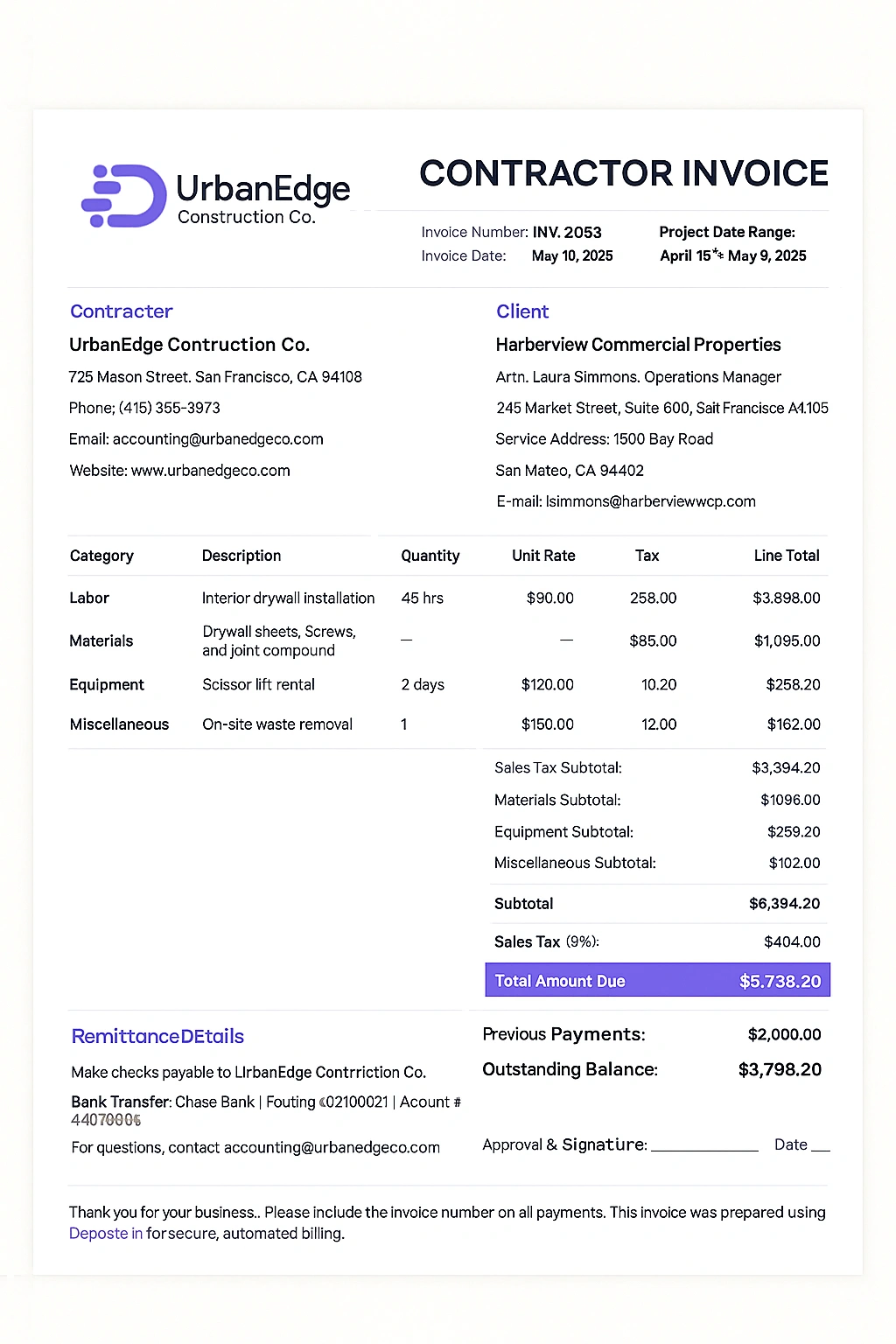
Clear, itemized charges make it easy for reviewers to verify totals and approve payment quickly. Use precise fields that mirror your contract language so finance teams can match work to billing without extra steps.
Descriptive line items should show quantity, unit, unit price, taxes, discounts, and the final amount. Keep each line concise so a reviewer can scan and validate calculations.
Add short context notes: phase name, milestone, service dates, or PO/project codes. These snippets help a customer map charges to internal records and lower questions from finance teams.
Consistent naming and concise usage summaries cut disputes and help you get paid on time. Clear information speeds approvals and shortens payment cycles.
An invoice processing automation software removes repetitive tasks so teams spend time on exceptions, not data entry. Digital software can automate creation, sending, reminders, and collections to lower manual errors and speed cash flow.
Move from manual processes to an automated workflow to reduce re‑keying and standardize how each invoice is built and approved. A single system ties time entries and project rates to the invoice so totals match accounting records.
Use software that creates invoices from time and project data, sends them by email, and records delivery events. This reduces variance across teams and keeps fields consistent.
Enable read receipts and open tracking to confirm delivery and time follow‑ups. Schedule polite reminders and offer online payment links to shorten days outstanding.
Central data ensures rates, quantities, and clients align with contracts. Permissions and audit trails add accountability for edits and approvals.
Generate aging reports and balance summaries to inform collections and cash forecasting. Use analytics to spot approval or payment bottlenecks and adjust the reminder cadence until it feels helpful, not pushy.
Send the bill while the work is fresh in a client’s mind to speed approval cycles. Immediate billing reduces the lag between delivery and review, and it makes payment action more likely. Use a consistent process so each invoice reaches the right person quickly.
Issue the invoice as soon as a milestone or delivery completes. This lowers the chance that details get forgotten and cuts days between delivery and payment.
Include the invoice number, total, and due date in the first lines so the customer can act without searching.
Document a follow-up process: a friendly reminder a few days before due date, a prompt on the due date, then polite escalation in the following days if unpaid.
Use tracking signals like email opens to time messages. Copy both operations and finance contacts to make sure the right stakeholders see the request.
.webp)
Predictable billing schedules turn uneven work into steady cash inflows. Monthly progress invoices level revenue recognition and smooth cash across multi‑phase projects.
Use clear monthly progress payments to match billing to deliverables. This approach stabilizes revenue and makes forecasting simpler.
Tie each monthly invoice to concrete milestones. Short notes that reference the phase or deliverable speed approvals and justify payment.
Document consultant payout dates and align them to expected client receipts. Collect from clients before paying contractors to avoid funding gaps and preserve working capital.
Set a policy to hold payments to external resources until receipts clear. Monitor aging by cohort and adjust follow‑up cadence when balances slip past target windows.
Small errors in bills can turn quick approvals into weeks of back‑and‑forth. Fixes are straightforward when you act with a simple checklist and clear deadlines.
Delaying an invoice leads directly to cash delays. Set firm internal send dates so work and payments align.
Use a standard template so invoices look the same for clients and speed approvals. Double‑check calculations, taxes, and totals to make sure errors do not trigger extra questions.
Record partial payment invoices promptly and send amended statements so balances are clear. A documented follow‑up process removes guesswork and keeps payments moving.
Log reminders and responses to improve tracking and team accountability. Validate reference fields, PO numbers and project IDs, before you send to avoid outsized delays in larger organizations.
DepositFix speeds the path from delivery to cleared funds, as it automates routine billing tasks and centralizes related project data. The result is more predictable cash flow and less time chasing unpaid amounts.
Use the software to generate professional invoices and send them immediately after delivery or on a set schedule. Enable online payments and automate follow‑ups based on status and due dates.
Centralize time, project, and invoice data so records stay aligned and audit‑ready. Monitor receipts with tracking and reports that surface trends and exceptions.
Book a call to see DepositFix in action and map setup to your processes. Discuss goals for faster collections and cleaner workflows, and we’ll propose a tailored plan.
Prefer to explore first? Contact us for a focused demo and a short walkthrough of the system.
Well-structured bills reduce back‑and‑forth and speed payment decisions. Send invoices on time, use a simple, consistent format, itemize charges clearly, and state payment terms so reviewers can act quickly.
Align invoice cadence with project milestones or monthly cycles to stabilize cash flow. Build a repeatable creation, review, and follow‑up process so your team spends less time chasing payments and more time serving clients.
Thoughtful design and precise details cut friction for customer reviewers. Adopt light automation and tools for tracking, reminders, and reporting to strengthen management and accounting accuracy.
Document fees, scope, and terms at onboarding, keep a clear dispute contact, and review aging regularly. A disciplined billing approach is one of the simplest, highest‑leverage ways to protect cash, support growth, and preserve client trust.
Discover the hidden automation in your payment, billing and invoicing workflows. Talk to our experts for a free assement!


